October 13, 2010

IIS 7: Faulting module name: mscorwks.dll Faulting application name: w3wp.exe

We experienced w3wp process crash during our testing on staging environment, with following dump in the event log.

      Faulting application name: w3wp.exe, version: 7.5.7600.16385, time stamp: 0x4a5bd0eb
      Faulting module name: mscorwks.dll, version: 2.0.50727.4952, time stamp: 0x4bebe78c
      Exception code: 0xc0000005

Environment:
   IIS 7
   ASP.NET
  .NET 3.5
  Windows Server 2008, 64 bit
 

We had following three issues crashing the asp.net w3wp process:

1. Check whether the application pool's user has permissions  ( To detect, see this post )
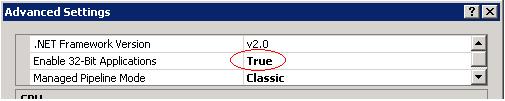
2. Check whether enable 32-bit applications setting is true (Go to advance settings of the application pool)
 
3. Check whether your code is in infinite loop (we had ISAPI URL rewrite module going in long recursive for particular urls. For more details,see my other post)

Once these are in place, things went smoothly.

How did we find the issue earlier:
 
          All team testing on staging environment helped us in finding these issues sooner, making the production deployment much smoother. This particular team didn't have the safety net of tests, as technical practices that enable Agile is not followed during development. By that time I joined the team, it was too late to bring the technical practices to the team. So I had to request all team testing in staging environment covering major scenarios.

This exercise proved me once again that It's never too late to test, and get the quick feedback.
In any process, I found XP practice "Test Early, Test Often, Test Automated" is very essential in delivering quality software. That to me is the core of Agile practices. It enables the Agile.

October 7, 2010

Isolating URL rewriting changes- ASP.NET IHttpModule + simple Ruby test for Quick Feedback

            I had to deal with URL rewriting very recently for a site. The old site was using ISAPI Rewrite module, so we decided to continue to use it, even though IIS7 comes with the URL rewriting module. Our SEO team came up with better URL scheme for the new site. As Search Engines indexed the old site URLS, a mapping between the old scheme and the new scheme had to be implemented, with proper redirection(301 status code) where ever necessary. 
 
Most of the URL scheme mapping involved regular expressions. I have had used regular expressions time to time, but not that extensive as required by this effort.

Following two things kept my fear factor very high, as this effort was added to the release very late.
       1)  making sure all 4000 possible old site links redirected to correct links in the new site
       2)  making sure new URL scheme works

When my fear factor goes high, I usually lean on tests.  I tried with tools used by SEO team, but they weren't quick enough.  I just wanted to focus on testing the URL rewriting in isolation with out running entire asp.net page processing.
  
So I needed to come up with a isolated testing solution that gives me quick feedback. A custom HTTP module came in handy for this situation. The idea is to have a ASP.NET HTTP module, that does nothing but writes the rewritten URL in begin request event, and ends the request.


My manual testing got faster, as the page responses were coming quickly with URL in the body.  I could finish new URL scheme working with manual testing.

Half of the battle is won. Still my fear factor is high, as I didn't have time to manually test all those 4000 old site links, while making sure nothing breaks as I add regular expressions for old scheme to new scheme mapping.

That's when I turned to Ruby. I have been playing around with Ruby on and off.  I decided to use Ruby to write tests to hit the site with all the links that I want to test.

So I got from the SEO team the list of old site links with following format in a spreadsheet.
        Old Scheme                 new scheme                         expected status code

I wrote not more than 200  lines of  ruby code which reads this test data from excel, and hit the server using net/http module, and saves the results back to the excel.It also prints the test results on the console similar to NUnit. This testing solution tested around 4600 links in about a minute.  All my fear was gone away when I looked at the test results in command window.(a sample test window is shown below.)
                    

This quick feedback helped us in finding the issues quickly. These tests in conjunction with SEO tools helped us in finding  the recursive behavior of URL rewriting which was crashing w3wp process.  SEO tools found a recursive behavior that was sending permanent redirects in loop. We had configuration file of  ISAPI rewrite engine's earlier version, which created this recursive behavior. Once it's removed,everything went smoothly.

Now with the safety net of tests, changes to url rewritings can be accomplished easily. It allows us to switch to different URL rewriting engines in future if the situation demands. Team can now embrace the change in much the XP way.

Next tasks added to my Todo list:
 1)  Add these tests to continuous integration.
 2)  Add a redirection limit to the test expectations to keep a tab on the looping behavior of URL rewrite engines.

This is my first ruby program at work. I am planning to use more ruby in writing tests.
Some of the ruby inspirations came from the book Everyday Scripting with Ruby: For Teams, Testers, and You.


This is how  XP's Test early, Test often, and Test Automated was applied.

Wish you a fearless programming.
March 14, 2010

C# 4.0: Code might smell with Optional Parameters

      I wrote few tests to understand Named, and Optional Parameters, and also reflected them in reflector to see what happens behind the scene.Now let's think about their impact on code readability.

      These would be very useful in calling Office Automation API. We don't need to worry about passing Type.Missing to zillion arguments, we can now just pass necessary arguments with the use of Named parameters.

       I can see misuse as well. I won't be surprised to see functions with lengthy optional parameters. That brings me a question: How many parameters can a function  have? I often find myself  debating whether a parameter can be an instance field of current object, or some other object. Let's turn to an expert, and see what he thinks.

        Uncle Bob talked about functional arguments in his articles for InformIT, and there is a dedicated chapter in his book Clean Code.  He says in this article Avoid Too Many Arguments, "Functions should have a small number of arguments. No argument is best, followed by one, two, and three. More than three is very questionable and should be avoided with prejudice.".

Clean Code: A Handbook of Agile Software Craftsmanship         He also recommends to not to have boolean arguments, as this is an indication that a function is doing two things. He writes in this article Eliminate Boolean arguments  "Boolean arguments loudly declare that the function does more than one thing. They are confusing and should be eliminated.". "Arguments are hard. They take a lot of conceptual power.", Uncle Bob writes in the book Clean Code.Writing unit tests for function with many arguments will be harder. Tests should cover all possible combinations of the parameters.
Refactoring: Improving the Design of Existing Code
   
       If you end up having function with more arguments, you can try following refactorings. Related Refactorings: (The book refered in this catalog) 
Replace Parameter with Method
Replace Parameter with Explicit Methods
Replace Record with Data Class
Parameterize Method
Remove Parameter

C# 4.0: Reflecting Named & Optional Parameters

I wrote few tests to understand Named and Optional Parameters. Now it's time to reflect.
I wrote few tests to see the what happens behind the scene.

Tests.
1. Reflecting Optional with default values
public void MethodWithDefaultValue(string name ="N/A", int cound =50)
 {
 
 }
gets converted to
public void MethodWithDeffaults([Optional, DefaultParameterValue("N/A")] string name, 
[Optional, DefaultParameterValue(50)] int count) 
{
}
You can declare a method using Optional Attribute, which allows you to have optional reference objects.

2. Reflecting Optional parametes when ommitted : When above method is called
public void ReflectMethodSignatureForOptionalWithDefaultValue()
{
ReflectClass optionalWithDefaultValue = new ReflectClass();
optionalWithDefaultValue.MethodWithDefaults();
}
gets converted to
public void ReflectMethodSignatureForOptionalWithDefaultValue()
{
new ReflectClass().MethodWithDefaults("N/A", 50);
}
Default values for the optional arguments are injected in the caller code.

3. Reflecting Named Parameters: if method in Test 1 called with named parameters,
public void ReflectNamedParametersCallerCode()
{
   ReflectClass optionalWithDefaultValue = new ReflectClass();
  optionalWithDefaultValue.MethodWithDefaults(count: 20, name: "Hello");
}
gets converted to
public void ReflectNamedParametersCallerCode() 
{ 
 ReflectClass optionalWithDefaultValue = new ReflectClass();
 int CS$0$0000 = 20;
string CS$0$0001 = "Hello";
optionalWithDefaultValue.MethodWithDefaults(CS$0$0001, CS$0$0000);
}
In the caller code,  A  local variable is created for every named parameter.
Complete Listing: In case you want to see yourself in reflector. Mouse hover on the listing to see clipboard/view source options.
using System;
using System.Collections.Generic;
using System.Linq;
using System.Text;

namespace episodes
{
    
    public  class ReflectingNamedOptionalParams
    {
        public void ReflectMethodSignatureForOptionalWithDefaultValue()
        {
            ReflectClass optionalWithDefaultValue = new ReflectClass();
            optionalWithDefaultValue.MethodWithDefaults();
        }
        public void ReflectNamedParametersCallerCode()
        {
            ReflectClass optionalWithDefaultValue = new ReflectClass();
            optionalWithDefaultValue.MethodWithDefaults(count: 20, name: "Hello");
        }
    }

    public class ReflectClass
    {
        public void MethodWithDefaults(string name="N/A",int count=50)
        {
            
        }
    }
}

C# 4.0: Optional Parameters

C# 4.0 introduces optional parameters along with named parameters. A method can have optional parameters, which allows callers to skip them. A default value, which should be constant. can be specified for a optional parameter as part of the method declaration. When caller omits a optional parameter, a default value will be passed to the method. With the use of Named parameters syntax, you can skip some optional parameters in the order.  This is very useful when calling a COM interop assembly like Office integration.  I wrote few tests to understand these concepts. I wrote few tests on Named Parameters.
Note: VS2010, and NUnit is required to use this code as is in your machine.Mouse hover on the listing, you will see options like copy to clipboard,view source.

Tests:
TestOptionalAttribute
SkipOptionalParameters
SkipOrderWithTheUseOfNamedParmeters
TestOverloadResolution

using System;
using System;
using System.Collections.Generic;
using System.Linq;
using System.Runtime.InteropServices;
using System.Text;
using NUnit.Framework;

namespace LearningCSharp40
{
    public class ParamArg
    {

    }
    public class UseOfOptionalAttribute
    {
        public string StringValue { get; set; }
        public UseOfOptionalAttribute([Optional]string param, [Optional] bool flag)
        {
            StringValue = param;
            BooleanValue = flag;
        }

        public ParamArg OptionalObjects([Optional]ParamArg arg, [Optional] ParamArg arg2)
        {
            return arg;
        }

        public bool BooleanValue { get; set; }
    }

    public class OptionalParamWithDefaultValue
    {
        public string StringValue { get; set; }
        public OptionalParamWithDefaultValue(string param)
            : this(param, true)
        {

        }

        public OptionalParamWithDefaultValue(string param = "N/A", bool flag = true, string name = "hi")
        {
            StringValue = param;
            BooleanValue = flag;
            Name = name;
        }
        public string Name { get; set; }
        public bool BooleanValue { get; set; }
    }

    [TestFixture]
    class LearnOptionalParams
    {
        //.NET reflector: When used with Optional attribute, compiler does substitute the default values of the types.
        [Test]
        public void TestOptionalAttribute()
        {
            UseOfOptionalAttribute useOfOptionalAttribute = new UseOfOptionalAttribute();
            Assert.AreEqual(useOfOptionalAttribute.StringValue, null);
            Assert.AreEqual(useOfOptionalAttribute.BooleanValue, false);
            Assert.IsNull(useOfOptionalAttribute.OptionalObjects(), "expecting null");
            Assert.IsNotNull(useOfOptionalAttribute.OptionalObjects(new ParamArg()), "expecting null");

        }

        [Test]
        public void SkipOptionalParameters()
        {

            OptionalParamWithDefaultValue optionalParamWithDefaultValue = new OptionalParamWithDefaultValue("Hello");
            Assert.AreEqual(optionalParamWithDefaultValue.StringValue, "Hello", "Expecting value passed in constructor");
            Assert.AreEqual(optionalParamWithDefaultValue.BooleanValue, true, "Expecting default value of flag");
            Assert.AreEqual(optionalParamWithDefaultValue.Name, "hi", "Expecting default value of Name");
        }

        [Test]
        public void SkipOrderWithTheUseOfNamedParmeters()
        {
            bool result = false;
            OptionalParamWithDefaultValue optionalParamWithDefaultValue = new OptionalParamWithDefaultValue(flag: result);
            Assert.AreEqual(optionalParamWithDefaultValue.StringValue, "N/A");
            Assert.AreEqual(optionalParamWithDefaultValue.BooleanValue, result);
        }


        [Test]
        public void TestOverloadResolution()
        {
            OverloadResolution overloadResolution = new OverloadResolution();
            Assert.AreEqual("NoArg", overloadResolution.Confused(), "Priority is for matching method signature: method with no arguments should be called");
            Assert.AreEqual("1Arg", overloadResolution.Confused("Hello"), "Method with one argument should be called");
        }
    }
    public class OverloadResolution
    {

        public string Confused()
        {
            return "NoArg";
        }

        public string Confused(string stringValue)
        {
            return "1Arg";
        }

        public string Confused(string stringValue = "N/A", bool flag = true)
        {
            return "2Arg";
        }

    }

}


March 9, 2010

C# 4.0: Named Parameters

C# 4.0: Named Parameters : C# introduces Named parameters. While calling a method, name: value pair syntax can be used for the parameters. Order doesn't matter. As you might guess, Named parameters can't precede optional parameters. I wrote few tests to understand these concepts.
You need VS2010, and NUnit if you want to try this code as is on your machine.

using System;
using System.Collections.Generic;
using System.Linq;
using System.Text;
using NUnit.Framework;

namespace LearningCSharp40
{
    public class Division
    {
        public int Divide(int dividend, int divisor)
        {
            return dividend / divisor;
        }
    }
    [TestFixture]
    public class LearnNamedParameters
    {
        Division division = new Division();
        private int quotientFromPositional = 0;
            
        [SetUp]
        public void Setup()
        {
            quotientFromPositional = division.Divide(20, 10); // positional
        }

        [Test]
        public void  QuotientShouldbeSameWhenCalledWithNamedParameters()
        {
            int quotientWithNamedParams = division.Divide(dividend: 20, divisor: 10); // named parameters
            Assert.AreEqual(quotientFromPositional, quotientWithNamedParams, 
                            "quotient should be 2 even with named parameters");
       
        }
        
        [Test]
        public void NamedParametersInDifferentOrder()
        {
            int quotientWithNamedParamsInDifferentOrder = division.Divide( dividend:20,divisor:10); // Order is different
            Assert.AreEqual(quotientFromPositional, quotientWithNamedParamsInDifferentOrder, 
                            "quotient should be same even called with named paratmeters in different parameter");
        }

       
        [Test]
        public void QuotientShouldBeSameWhenMixOfPositionalAndNamedApproachIsUsed()
        {
            int quotient = division.Divide( 20, divisor: 10); 
            Assert.AreEqual(quotientFromPositional, quotient,
                            "quotient should be same even with mix of positional, and named parameters");

        }
        [Test]
        [Ignore]
        public void NamedParametersCantProcedePosition_CompilerError()
        {
            Division division = new Division();
            //Uncomment to see the compiler error...
            // int quotient = division.Divide( dividend: 20,10); // named parameters cannot procede positional
            // Assert.AreEqual(2, quotient, "quotient should be 2 even with named parameters");
        }

        [Test]
        [Ignore]
        public void NamedParameterSpecifiesAParameterForWhichAPositionalArgumentHasAlreadyGiven_CompilerError()
        {
            Division division = new Division();
            //Uncomment to see the compiler error...
           // int quotient = division.Divide( 20,dividend:20); 
        }
    }
}

March 1, 2010

.NET 4.0: New API


.NET 4.0 adds several new methods. 
1) Enum.HasFlag  checks  whether a flag field present in the enum instance.


[Flags]
public enum PizzaToppings
{
Onions = 1,
Mushrooms = 2,
Chicken = 4
}
PizzaToppings myToppings = PizzaToppings.Onions |
PizzaToppings.Mushrooms;
 
Assert.IsFalse( myToppings.HasFlag(PizzaToppings.Chicken),
"Chicken is not expected"); 
2) String.IsNullOrWhiteSpace can be useful when whitespace condition needs to be checked along with Empty, and Null conditions.


[Test]
public void TestIsNullOrWhiteSpace()
{
string s = " \t ";
Assert.IsTrue( string.IsNullOrWhiteSpace(s),
"tabbed white spaces");
Assert.IsTrue(string.IsNullOrWhiteSpace(null), "Null");
Assert.IsTrue(string.IsNullOrWhiteSpace(""), "Empty");
Assert.IsTrue(string.IsNullOrEmpty(" \t ".Trim()));
}

February 22, 2010

.NET 4.0 WCF: Issues with WebFaultException

         In WCF 3.5,  WebHttpBinding  doesn't return faults in expected response format. It ignores the format specified in the contract, and returns the error in html format. I was expecting error to be in the format specified in the WebGet/WebInvoke. For one of my project with WCF RESTful/JQuery solution stack, I end up writing a custom error handler implementing IErrorHandler to receive the fault in the desired JSON format.

         .NET 4.0 introduces a class WebFaultException<> to tackle this formatting issue. What all you have to do is throw the fault using this class, and you get the HTTP response in correct desired format. Digging deep the WebHttpErrorHandler with Reflector, I found that formatting decision is made based on type of the fault thrown.The expected fault should of type  IWebFaultException. WebFaultException implements IWebFaultException.

        I see few problems with this solution. If I forget to use WebFaultException in one of my operation implementation, I am screwed, I get response in same old html format. Deriving message format from the implementation(i.e. service behavior) seems to me odd.  Second one, If I have to go with this solution and to retire my custom error handler, I will have to modify code in several places changing use of FaultException to WebFaultException. These two issues making me to think whether I should stick with custom error handler solution unless situtation demands for different status codes. With WebFaultException, you can set http status code.   I was just throwing one status code BadRequest, and application specific status codes were in the fault details object.

February 16, 2010

Improving learning skills

             In Year 2009, I luckily found two books  How to Read a Book and Pragmatic Thinking & Learning. These books helped me in enhancing my learning abilities.  I wish I had these books especially How to Read a Book in my high school curriculum. But it is never too late.In this book,  You would find several key skills such as how to actually own a book not just physical ownership, note making, how to decide quickly whether a book is worthy of your valuable time, and when to agree/disagree with author, the absent teacher so on.Book talks about use of information in book cover, preface, and table of contents.
                 
                 With these new skills in reading, I am rereading my favorite books. Lot of satisfaction these days I have in reading. 

                  If How to Read a Book makes you a demanding reader by empowering you with the necessary skills in reading difficult books,  Pragmatic Thinking & Learning helps you in taking care of your inner learning and thinking processes. Writing a book on thinking is tough, but the author Andy Hunt has done fantastic job in covering the subject.  If you don't know Andy Hunt, He is one of the signatory of agile manifesto, and author of several books. This book gives you not only practical tools in improving your thinking and learning, but also gives you tools for your awareness.  What matters most, at least to me, is this awareness. Tools might go, but this awareness stays with you, and helping you in growing your mind. Book talks about use of Mind maps, Screencasts, Podcasts, Blogging, and Wiki, and how you can integrate these tools in to your learning & thinking process.
                                 
                  I was reluctant to blog, but these books changed my view, and I am here writing first post for my blog.  I am thankful to the authors Andy Hunt, and Mortime  J. Adler. 

            
                For those, who like to read  but don't have time, I recommend you  Pomodoro technique.  This simple technique helps you in gaining quality of your time. Best of Luck.